Trace every connection once. Dots may be revisited. Tab or arrow keys focus a dot; Enter or Space chooses it. Backspace undoes a step.
Opening your notebook…
1 of 90
Your notebook opens on this device.
THE ILLUSTRATED FIELD GUIDE / ONE LINE
One stroke. Every connection.
Trace every grey connection exactly once. You may pass through the same dot again, but may not use the same connection twice. Crossings without dots are not junctions. There is no timer, and you can lift your finger between moves.
01
Choose a dot and follow a link
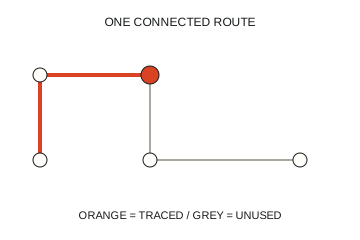
Orange is your completed route. Grey is still to be traced.
Tap a dot to begin, then choose a neighbouring dot joined to it by a grey connection. The traced part turns orange; the orange dot marks your current position. Drag through several connected dots, or take the route one tap at a time.
02
Revisit a dot using a new link
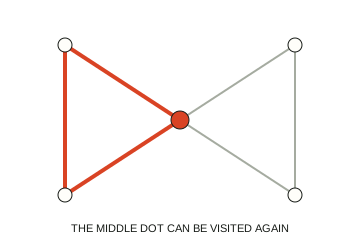
Return to the centre, then take a connection you have not used.
A dot can connect several loops. In this example, the left loop returns to the middle dot; you can then continue into the right loop along an unused connection. Crossing an old dot is fine. Going backwards over an orange connection is not.
03
Count the connections at a dot
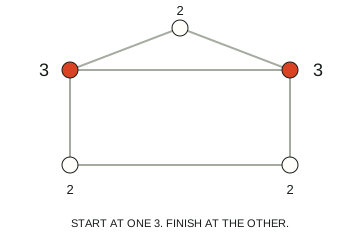
Two odd dots: one start and one finish.
If exactly two dots have an odd number of connections, start at one and finish at the other. If every dot has an even number, you can begin anywhere and return to your start. The two highlighted dots here each have three connections.
04
Leave a way into the next part
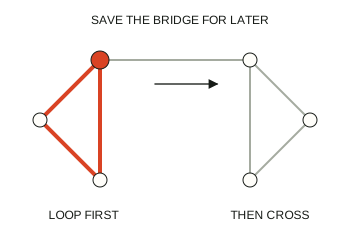
Finish this loop before crossing the only link to the other side.
A bridge is the only connection joining two parts of a puzzle. If you cross it too early, you can leave unused links behind with no way back. Finish the loop on your side before crossing. Undo one step or ask for a Hint when a route gets stuck.
THE FINISH LINE
What counts as complete?
Trace all connections once in a single connected route. The connection counter must reach the total. Visiting every dot is not enough if a grey connection is still left.
ONE TO REMEMBER
A common wrong turn
Where two lines cross without a dot, keep following your connection; you cannot turn there. Reusing a dot is legal, but retracing an orange connection is not.
AT YOUR FINGERTIPS
Controls & a little help
Click or tap dots, or drag along a route. Tab and arrow keys move focus between dots; Enter or Space chooses one. Backspace/Delete undoes a step while a dot is focused. Undo removes your last step; Hint suggests a route forward and can explain needed backtracking. Restart confirms before clearing the current drawing.
PICK UP WHERE YOU LEFT OFF
Your notebook
All 90 puzzles across six levels are available from the start. Each drawing and solved puzzle saves in this browser. Five new solves within a level earn a checkpoint seal; all 15 earn its badge. Replays keep your record without awarding duplicate milestones. Clearing site data removes the notebook; there is no account or device sync.