01
Meet the three groups
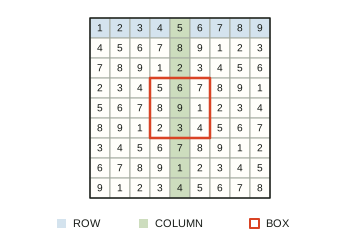
A square belongs to one row, one column and one 3 × 3 box. Before placing a number, look through all three. If that number already appears in any of them, the square needs something else.
 Sudokuloft
Preparing your puzzle…
Fill every empty square with a number from 1 to 9. Each row, column and outlined 3 × 3 box needs all nine numbers, once each. The printed numbers are fixed clues. You are finding what fits; there is no arithmetic to do.
A square belongs to one row, one column and one 3 × 3 box. Before placing a number, look through all three. If that number already appears in any of them, the square needs something else.
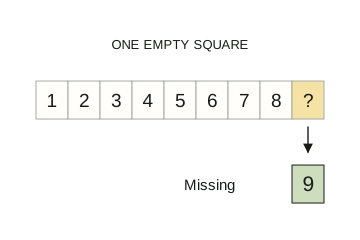
Look for a nearly finished row, column or box. In this example, the row has 1 through 8, so 9 is missing. Check the empty square’s column and box as well before entering it. One certain answer can help you find the next.
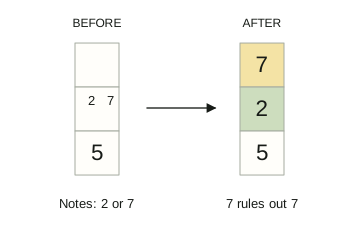
When more than one number could fit, turn Notes on and pencil in possibilities. Suppose a square could be 2 or 7. Once 7 is fixed elsewhere in its column, remove that candidate: 2 is the remaining choice. Notes are possibilities, not final answers.
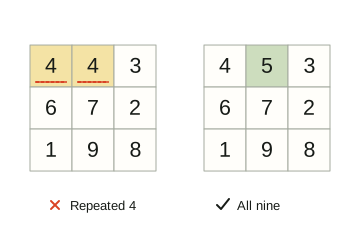
A filled group is correct only when it contains every number once. The left box repeats 4 and has no 5. Replacing the mistaken 4 with 5 gives nine different numbers. Apply the same check to every row, column and box.
Complete all 81 squares with valid rows, columns and boxes. Completion is recorded once for that saved puzzle; hints and mistakes are shown in your result. Easy, Medium, Hard and Very Hard change the starting clues; Very Hard needs deeper deduction.
A number can fit its row and still conflict with its box. Always check all three groups. A pencilled note is not a completed square, and a printed clue cannot be erased.
Tap a square, then a number, or use 1–9 on a keyboard. Arrow keys move between squares. Notes (N) records candidates; Backspace or Erase clears an entry; Undo or Ctrl/Cmd+Z reverses a move. Hint supplies a correct number. Pause hides the grid, and settings control the timer and related-square highlight.
Your current puzzle saves by date and difficulty in this browser, along with notes and local statistics. Daily gives you a dated puzzle. Free play replaces the current saved grid for that date and level after confirmation when needed; it is not a separate unfinished-puzzle archive. There is no account or device sync.